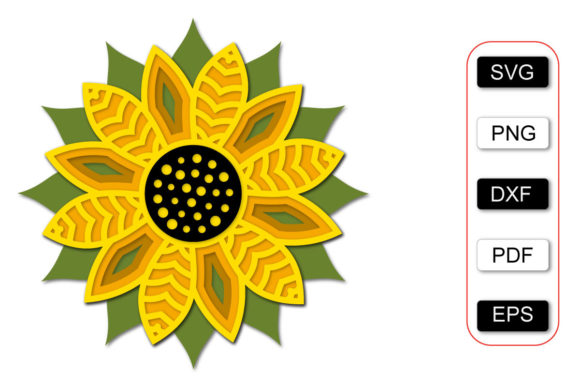
3D Sunflower
The transition from a digital concept to a tangible, high-quality physical product is often where creative projects stall. For designers, crafters, and small business owners, the gap between an idea on a screen and a finished item in hand requires precision, compatibility, and clear instructions. This is where specialized digital assets become critical infrastructure rather than mere decoration. The 3D Sunflower SVG cut file represents a sophisticated solution for creating layered, dimensional floral designs that go beyond standard flat cutting. It is not just a single image; it is a structured workflow tool designed to streamline the production of complex, multi-layered crafts.
Understanding how this asset functions within your broader design process is essential. Whether you are producing handmade jewelry, home decor, greeting cards, or marketing materials, the ability to execute clean cuts and precise layering directly impacts the perceived value of your final output. The 3D Sunflower is engineered to integrate seamlessly into existing workflows, reducing setup time and minimizing errors associated with manual tracing or incompatible file formats.
File Structure and Technical Compatibility
The effectiveness of any digital cut file relies heavily on its technical integrity and format versatility. The 3D Sunflower package is distributed across multiple formats to ensure compatibility with a wide spectrum of software and hardware ecosystems. This diversity is crucial for professionals who may switch between different platforms depending on the project requirements or client specifications.
At the core of the package is the SVG (Scalable Vector Graphics) format. As a universal vector format, the SVG file is editable in industry-standard software such as Adobe Illustrator, CorelDRAW, and Inkscape. This editability allows for significant customization. You can adjust the scale, modify colors, or tweak specific curves before sending the file to your cutter. However, the true power lies in the layered structure. Each petal and center component of the sunflower is contained in separate layers or files, enabling the creation of depth without requiring manual alignment guesswork.
- SVG: The primary vector format, compatible with Cricut Design Space, Silhouette Studio Designer, Make the Cut, Sure Cuts A Lot, Brother ScanNCut, Cameo, and other plotters. It ensures infinite scalability without pixelation.
- DXF: Often used for laser cutters and older vinyl cutters, providing a robust alternative for users whose primary machines do not fully support modern SVG nesting features.
- EPS: An Encapsulated PostScript file that serves as a reliable backup for professional design workflows, ensuring consistency when transferring files between different operating systems or design suites.
- PNG & JPG: High-resolution raster images provided at 300dpi with transparent backgrounds. These are invaluable for previewing the design, creating mockups for social media, or printing directly if a cut machine is unavailable.
- PDF: Useful for documentation, sharing with clients, or printing reference guides for assembly.
This multi-format approach mitigates risk. If one platform fails to render the SVG correctly due to version conflicts, the DXF or EPS files serve as fail-safes, ensuring your production timeline remains uninterrupted.
Integration into the Creative Workflow
Incorporating the 3D Sunflower into your workflow involves more than just importing a file. It requires a strategic approach to preparation, execution, and quality control. The layered nature of the design demands a methodical process to achieve the intended three-dimensional effect.
Preparation and Material Selection
Before loading material into your cutting machine, consider the substrate. The success of a 3D layered flower depends on the stiffness and finish of the paper or cardstock. Thicker cardstocks (65lb to 110lb) hold their shape better, while thinner papers may require adhesive backing or double-stick tape for structural integrity. The choice of material also affects the color palette. Since the layers are distinct, using varying shades of yellow, orange, and brown can enhance the visual depth, mimicking the natural gradient of a real sunflower.
Organize your workspace by sorting the layers logically. Many users find it helpful to label the cut pieces immediately after they exit the machine. This prevents confusion during assembly, especially when dealing with numerous small petals. Proper organization reduces cognitive load and speeds up the assembly phase.
Execution and Cutting Parameters
When importing the 3D Sunflower SVG into your cutting software, verify that the layers are intact. Some software may group all elements together upon import. Ungrouping the file is a necessary step to access individual layers for scaling or color assignment. Ensure that the registration marks are aligned if you are using a camera-equipped cutter like the Cricut Maker or Silhouette Cameo 4/5.
Set appropriate blade depth and pressure settings. Over-cutting can cause delicate petals to detach prematurely, while under-cutting leaves bridges that must be manually removed, risking damage to the fine details. Test cuts on scrap material are recommended, particularly when switching to new brands of cardstock. Consistency in cutting parameters ensures that every unit produced meets the same quality standard, which is vital for batch production.
Assembly and Layering Strategy
The defining feature of this design is its dimensionality. Assembly typically begins with the innermost layers—the center of the sunflower—and works outward. Using a strong, quick-drying adhesive or a glue dot applicator helps maintain speed. Align each layer carefully, allowing slight offsets if desired to create a more organic look, or keeping them perfectly centered for a geometric aesthetic.
Consider the application context. If the sunflower is part of a larger mandala design, ensure that the cumulative thickness does not interfere with adjacent elements. If it is a standalone piece, adding a shadow effect behind the bottom layer can enhance the 3D illusion when mounted on a wall or frame.
Business Applications and Scalability
For entrepreneurs and small business owners, the 3D Sunflower offers a scalable path to product diversification. The digital nature of the asset means there is no inventory cost for the design itself. Once purchased, you can produce unlimited units, limited only by your production capacity and material costs.
This asset fits well into several revenue streams:
- E-commerce Products: Create kits for hobbyists. Sell pre-cut layers bundled with assembly instructions. This adds value by saving the customer time and effort.
- Event Decor: Use the design for wedding centerpieces, birthday party decorations, or corporate event branding. The vibrant colors and elegant shape appeal to a broad demographic.
- Personalized Gifts: Integrate the sunflower into custom journals, planners, or framed art. The ability to edit the SVG allows for the addition of names, dates, or monograms, increasing the perceived value of personalized items.
- Digital Content Creation: Bloggers and educators can use the PNG versions for illustrations in articles, online courses, or presentations. The high resolution ensures clarity on both mobile and desktop screens.
By leveraging the 3D Sunflower, creators can move away from generic, mass-produced aesthetics toward unique, handcrafted qualities that resonate with consumers seeking authenticity. The efficiency gained from having ready-made, compatible files allows more time to focus on marketing, customer service, and innovation.
Quality Control and Long-Term Use
Maintaining quality over time requires attention to detail. Regularly check your cutting blades for dullness, as worn blades can tear delicate paper edges, ruining the crisp lines of the sunflower petals. Keep your software updated to ensure full compatibility with the latest SVG features. Additionally, archive your successful projects. Documenting which materials worked best and which assembly techniques were most efficient creates a knowledge base that improves future productivity.
The 3D Sunflower is more than a decorative element; it is a tool for operational excellence in the creative sector. By understanding its technical specifications and integrating it thoughtfully into your workflow, you can produce consistent, high-quality results that stand out in a crowded marketplace. Whether you are a seasoned pro or a hobbyist looking to elevate your craft, this asset provides the flexibility and reliability needed to bring complex designs to life efficiently.