Evaluating the 3D Fall Tree: A Comprehensive Guide to Layered Paper Crafts
The transition into autumn often inspires a desire for warm, inviting decor that captures the essence of the season. Among the various DIY options available, the 3D Fall Tree has emerged as a popular choice for crafters seeking depth and dimension in their projects. This specific design is not merely a flat cutout but a multi-layered construction that relies on precise alignment and color variation to create a visually striking effect. For those researching paper crafting resources, understanding the nuances of this project—particularly its eight-layer structure and file compatibility—is essential before beginning.
This article provides an objective overview of the 3D Fall Tree SVG, examining its technical specifications, material requirements, and how it compares to other decorative methods. The goal is to help you determine if this particular design fits your skill level, toolset, and aesthetic preferences.
Understanding the Design Structure
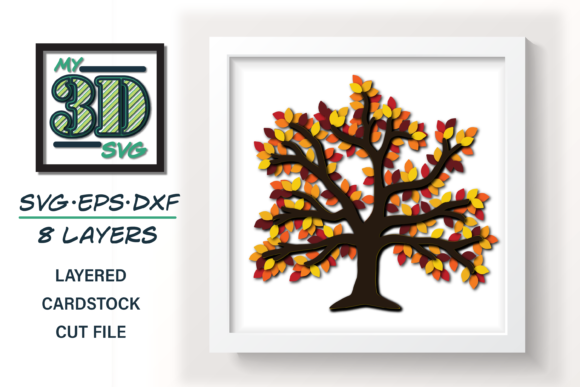
At its core, the 3D Fall Tree is an exercise in layering. Unlike single-piece silhouettes that rely solely on negative space or simple shape recognition, this design requires the assembly of multiple distinct components. The standard version consists of eight layers, each contributing to the overall volume and texture of the tree. This complexity allows for a more realistic representation of foliage density and trunk structure than traditional flat designs.
The primary advantage of this layered approach is the ability to customize the visual impact through color manipulation. Because each layer is separate, you are not limited to a single gradient or shade. Instead, you can experiment with complementary colors, contrasting tones, or monochromatic schemes. For instance, using deep burgundy for the outer leaves and bright orange for the inner layers can create a sense of light filtering through the canopy. This flexibility makes the 3D Fall Tree adaptable to various interior design styles, from rustic farmhouse to modern minimalist.
Material Considerations
To achieve the intended structural integrity and visual clarity, the choice of material is critical. The design instructions typically recommend using standard 8.5x11 cardstock. This size is convenient because it aligns with most home printers and cutting machines, eliminating the need for specialized large-format equipment. However, the thickness of the cardstock plays a significant role in the final outcome.
- Weight: Heavier cardstock (such as 65lb or 80lb) holds its shape better and prevents the layers from collapsing under their own weight. Lighter papers may require additional adhesive support or result in a flatter appearance.
- Color Consistency: Since the design involves multiple sheets, ensuring color consistency across batches is important. If you are purchasing pre-colored cardstock, check that the hues match across different packs.
- Texture: Smooth cardstock generally yields cleaner cuts, especially for intricate leaf details. Textured papers might obscure fine lines or cause blade drag during the cutting process.
File Formats and Software Compatibility
One of the strongest selling points of this digital product is its versatility in file formats. Crafters use a variety of software ecosystems, ranging from proprietary machine-specific apps to professional graphic design suites. The inclusion of multiple formats ensures that users are not locked into a single platform.
SVG for Cricut Design Space
The SVG (Scalable Vector Graphics) file is optimized for Cricut Design Space. This format preserves the vector paths necessary for clean cutting, allowing the software to recognize individual layers as separate elements. When imported, the design should automatically group the layers, simplifying the workflow. Users can easily resize the tree without losing quality, which is useful for adjusting the scale to fit specific display areas.
DXF for Silhouette Studio
For users of Silhouette Studio, the DXF (Drawing Exchange Format) file is provided. DXF is a widely accepted standard for computer-aided design and is fully compatible with Silhouette’s cutting engine. Like the SVG, the DXF version maintains the layer separation, enabling precise control over which parts are cut from which sheet of paper. It is advisable to check the "weld" or "union" settings in Silhouette Studio to ensure that overlapping elements do not interfere with the cutting path.
EPS for Professional Software
The EPS (Encapsulated PostScript) file caters to professionals and advanced hobbyists using software such as Adobe Illustrator, Make the Cut, CorelDRAW, and Inkscape. EPS files offer high fidelity and are ideal for users who wish to modify the design further before cutting. For example, you might want to adjust the curve of a branch or replace a leaf shape with a custom vector. This format provides the most control for detailed editing, making it suitable for commercial production or highly customized personal projects.
Comparison with Alternative Decorative Methods
When evaluating the 3D Fall Tree, it is helpful to compare it with other common ways to bring autumn decor into your home. Each method has distinct tradeoffs regarding cost, time, and durability.
vs. Real Branches and Foliage
Using real branches and leaves is perhaps the most organic approach. It offers authentic texture and scent. However, real foliage is temporary; it dries out, crumbles, and loses its vibrant color within weeks. Additionally, sourcing high-quality branches can be labor-intensive and messy. The 3D Fall Tree, by contrast, is permanent. Once assembled and displayed, it retains its shape and color indefinitely. It also eliminates the cleanup associated with shedding leaves and the potential for pests hiding in natural materials.
vs. Single-Layer Wall Art
Flat paper wall art is quicker to produce and requires less assembly. You simply cut one shape and adhere it to the wall. While efficient, these designs lack depth and can appear two-dimensional and static. The 3D Fall Tree addresses this limitation by introducing physical depth. The shadows cast by the overlapping layers add dynamism to the piece, making it a focal point rather than just background decoration. The tradeoff is the increased time investment required for cutting, sorting, and gluing eight separate layers.
vs. Printed 3D Pop-Up Cards
Some crafters attempt to create 3D effects using complex folding techniques similar to pop-up cards. These require advanced engineering skills and precise scoring to function correctly. The 3D Fall Tree simplifies this by using a stacking method rather than a mechanical folding mechanism. This makes it more accessible to intermediate crafters who may struggle with the geometry of pop-up structures. The stacking method is also more forgiving; slight misalignments can be adjusted with adhesive placement, whereas a failed fold in a pop-up card often ruins the entire mechanism.
Decision Factors: Is This the Right Choice?
Determining whether to invest time in creating a 3D Fall Tree depends on several factors. Below is a breakdown of scenarios where this project shines and situations where you might consider alternatives.
Best Fit Scenarios
- Seasonal Display Enthusiasts: If you enjoy changing your decor frequently and want a centerpiece that looks substantial, this tree is ideal.
- Multi-Machine Owners: Having access to both SVG and DXF files means you can switch between Cricut and Silhouette machines depending on availability or specific feature needs.
- Customization Seekers: If you have a specific color palette in mind that doesn't match pre-made decorations, the ability to choose your own cardstock colors is a major advantage.
When to Choose Another Option
- Time Constraints: Cutting and assembling eight layers is time-consuming. If you need decor quickly, a single-layer print or a store-bought item may be more practical.
- Limited Workspace: The process involves handling multiple small pieces. If your workspace is cluttered or small, managing the layers could be frustrating.
- Budget Limitations: While cardstock is inexpensive, buying enough sheets in various colors to experiment can add up. If budget is tight, sticking to a two-color scheme or using scrap paper is a viable workaround.
Practical Tips for Success
To ensure the best results when working with the 3D Fall Tree SVG, consider the following practical advice:
- Test Cuts: Always perform a test cut on a scrap piece of your chosen cardstock to verify blade depth and speed settings.
- Organize Layers: Label each layer as you cut it. Keeping track of which piece corresponds to which part of the tree prevents confusion during assembly.
- Use Quality Adhesive: Double-sided tape or foam dots can enhance the 3D effect by adding distance between layers. Liquid glue may warp thin cardstock if applied too heavily.
- Lighting: Position the finished tree near a light source to highlight the shadows and depth created by the layers.
In conclusion, the 3D Fall Tree represents a robust option for crafters looking to add dimension to their autumn decor. Its multi-format support and customizable nature make it a versatile tool in any crafter’s repertoire. By carefully considering your time, tools, and aesthetic goals, you can decide if this layered design is the right fit for your seasonal projects.