Halloween Shadowbox 2: A 3D Layered SVG Guide
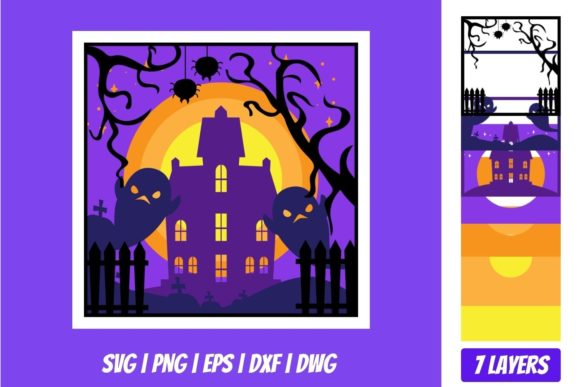
Creating a stunning Halloween display doesn’t require advanced woodworking skills or expensive machinery. With the right digital assets, you can produce professional-grade decorations that look like they came from a high-end boutique. The Halloween Shadowbox 2 3D Layered SVG is one such asset designed to bridge the gap between simple flat cutouts and complex physical installations. This file allows crafters, educators, and small business owners to create depth, dimension, and visual intrigue using standard cutting machines.
A shadowbox effect relies on layering multiple elements at varying distances from the background. When light hits these layers, it casts subtle shadows that bring the design to life. The Halloween Shadowbox 2 takes this concept further by providing pre-segmented, multi-layered files specifically optimized for this technique. Whether you are preparing for a classroom party, launching a seasonal marketing campaign, or simply decorating your home, understanding how to utilize this file effectively can elevate your creative output significantly.
Understanding the File Formats and Compatibility
The value of a digital cut file lies not just in its artistic design, but in its versatility across different software ecosystems. The download package for the Halloween Shadowbox 2 3D Layered SVG includes a comprehensive suite of formats: SVG, DXF, PNG, and EPS. Each format serves a specific purpose, ensuring that users with varying levels of technical expertise or different hardware setups can access the design.
- SVG (Scalable Vector Graphics): This is the primary format for most modern cutting machines. It is compatible with Cricut Design Space, Silhouette Designer Edition, Make the Cut (MTC), Sure Cuts A Lot (SCAL), and Brother Scan and Cut “Canvas” software. SVGs are vector-based, meaning they can be resized without losing quality, which is crucial when scaling a shadowbox from a small card to a large wall decoration.
- DXF (Drawing Exchange Format): Essential for users of Silhouette Basic Edition. While basic editions often lack support for SVG, DXF remains a universal standard that ensures accessibility for a wider range of machine owners.
- EPS (Encapsulated PostScript): Ideal for graphic designers working in CorelDraw, Inkscape, or Adobe Illustrator. If you plan to edit the design extensively before sending it to a cutter, or if you need to integrate it into larger print materials, EPS provides robust editing capabilities.
- PNG (Portable Network Graphics): Included as a reference image with a transparent background at 300 DPI. This high-resolution photo file helps visualize the final layered effect before cutting and can be used for digital mockups or social media previews.
Having all these formats in a single zipped folder streamlines the workflow. You don’t need to hunt for converters or worry about compatibility issues. This ready-to-use structure saves time, allowing you to focus on the assembly rather than troubleshooting file errors.
Key Characteristics of the Design
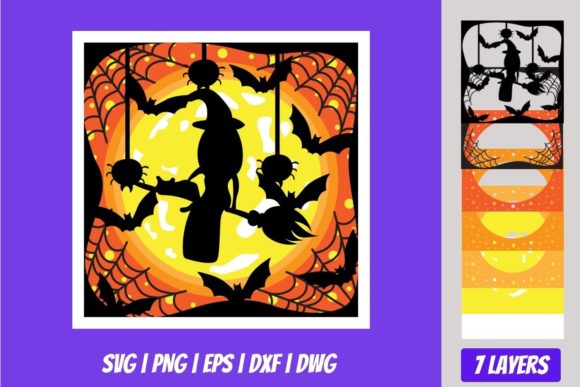
The Halloween Shadowbox 2 3D Layered SVG is engineered with precision. Unlike generic clipart that consists of a single silhouette, this design is broken down into distinct layers. Each layer represents a different plane of depth, from the background scenery to foreground characters or objects. This segmentation is critical for achieving the 3D effect.
The intricate details within each layer allow for fine craftsmanship. Whether you are cutting vinyl, cardstock, foam board, or wood veneer, the clean lines and precise cuts ensure that pieces fit together seamlessly. The design typically features classic Halloween motifs—such as pumpkins, ghosts, bats, or haunted houses—but arranged in a way that emphasizes spatial relationships. By spacing these layers apart, you create a tunnel-like visual experience that draws the viewer’s eye inward.
Practical Applications Across Industries
The utility of this file extends far beyond personal hobbyist projects. Its adaptability makes it a valuable tool for various professional and educational contexts.
Home Decor and Personal Crafts
For homeowners and DIY enthusiasts, the Halloween Shadowbox 2 offers an affordable way to update seasonal decor. Instead of buying plastic props that clutter storage space, you can create lightweight, durable shadowboxes using materials you already have. Cardstock is inexpensive and easy to work with, while foam board adds rigidity and a premium feel. These decorations can be displayed in windows, hung on doors, or placed on mantels, adding a sophisticated touch to traditional holiday aesthetics.
Educational Settings
Educators can leverage this file for STEM (Science, Technology, Engineering, and Math) or art lessons. Creating a shadowbox involves geometry, spatial reasoning, and fine motor skills. Teachers can guide students through the process of measuring, cutting, and assembling layers, turning a fun holiday activity into a structured learning experience. Furthermore, the resulting displays can serve as engaging classroom decorations that stimulate student interest during the autumn months.
Small Business and Retail
Entrepreneurs and retail store owners use seasonal displays to drive foot traffic and enhance brand engagement. A well-executed shadowbox window display can stop passersby in their tracks. Because the Halloween Shadowbox 2 3D Layered SVG produces a high-quality result, businesses can maintain a professional image without hiring expensive graphic designers or decorators. Small boutiques, cafes, and pop-up shops can quickly refresh their storefronts for the holiday season, signaling to customers that the business is active and attentive to trends.
Digital Marketing and Content Creation
Bloggers, influencers, and marketers can use the included PNG preview for creating compelling social media content. Before producing physical items, creators can showcase the design in digital campaigns. Additionally, those who sell handmade goods can offer custom versions of this shadowbox as part of their product line, expanding their inventory with minimal upfront cost.
Benefits of Using Layered SVG Files
Choosing a layered SVG over a standard single-cut file offers several distinct advantages related to usability, appearance, and efficiency.
Enhanced Visual Impact: Flat designs often lack presence. By introducing depth, the Halloween Shadowbox 2 creates a dynamic focal point. The interplay of light and shadow adds a mysterious, atmospheric quality that resonates strongly with the Halloween theme.
Customization Flexibility: Because the layers are separate, you can experiment with color combinations and material choices for each element. You might choose a translucent red vinyl for a pumpkin layer to simulate a glowing effect, or use black matte paper for silhouettes to maximize contrast. This level of control allows for unique variations of the same base design.
Cost-Effectiveness: Digital files have a one-time purchase cost but unlimited usage potential (subject to the license terms). For businesses, this means lower per-unit production costs compared to buying pre-made decorations. For individuals, it eliminates the need for repeated purchases of single-use decor.
Practical Considerations for Implementation
While the file itself is straightforward, successful execution requires attention to detail. Here are some recommendations for getting the best results with the Halloween Shadowbox 2 3D Layered SVG.
Material Selection: The thickness of your material affects the spacing between layers. Thicker materials like foam core will naturally create more depth, while thin cardstock may require additional spacers (such as double-sided tape or foam dots) to achieve the desired 3D separation. Test your chosen material with a small section first to determine the optimal spacing.
Cutting Precision: Ensure your cutting blade is sharp and calibrated correctly for the material. Dull blades can tear delicate layers, compromising the clean edges necessary for a professional look. Regularly check the registration marks if your machine supports them to ensure alignment.
Assembly Strategy: Plan your assembly order before applying adhesive. Typically, you start with the back layer and work forward. Use a bone folder to burnish edges if working with vinyl, or apply glue sparingly to avoid warping paper. Labeling layers with a pencil on the backside can help keep track of the sequence during assembly.
In conclusion, the Halloween Shadowbox 2 3D Layered SVG is more than just a decorative template; it is a versatile tool that empowers creators to produce high-impact visual content. By leveraging its multi-format compatibility and layered design, users across various sectors can enhance their projects with minimal effort and maximum creativity. Whether you are crafting for fun or driving business growth, this file provides a reliable foundation for seasonal success.